Chatstronomy
Chatstronomy logo.

A Discord bot for your telescope.

Observatory notifications and locally approved equipment control in your chat channels.

Chatstronomy monitors your N.I.N.A. rigs and posts the imaging updates you permit, including captures, autofocus runs, guiding graphs, and status changes. Discord slash commands can check on the rig; hardware control is available only when you approve it in N.I.N.A.

Before pairing a rig, review the hosted Hub privacy policy and hosted Hub terms.

The software supports N.I.N.A. 3.2+ on Windows, runs on standalone Windows and Linux backends, and is licensed under Apache-2.0.

The Chatstronomy plugin integrates directly with N.I.N.A.

The plugin reads N.I.N.A. natively, renders guider and autofocus graphs, retains selected safety and equipment state, reports sequence and image failures, sends the event families you choose, and exposes approved bot commands. No N.I.N.A. web server or polling setup is required.

Event switches control what leaves N.I.N.A. Disabled event families, including previously buffered events, are never sent to the hosted Hub or local bot; events captured while disabled cannot be released later. There is no background state-reconstruction exception. Disabling images also blocks image history, previews, thumbnails, and automatic image delivery. Other permitted equipment-status snapshots and explicitly requested non-image slash-command data remain available; raw N.I.N.A. logs are shared only when you enable individual log levels.

Once N.I.N.A. accepts a locally permitted command, its terminal failure is always returned as part of that command exchange. Optional event switches cannot hide that outcome.

Most standard event categories, image previews, and N.I.N.A. popup notifications start enabled. Review or disable them before pairing with the Hub or starting a local runtime. Meaningful weather changes, high-wind alerts, slew start/end diagnostics, and rotator move start/end diagnostics have separate controls and all start disabled. Raw logs, observatory-location sharing, the hardware-control master switch, and every individual hardware permission also start disabled.

The Chatstronomy Hub is the recommended setup.

Pair the plugin with Chatstronomy Hub for the simplest setup. Each N.I.N.A. machine connects outbound over authenticated WSS, so one centralized Discord bot can serve rigs on different systems without opening observatory ports or copying chat credentials to every computer. The hosted Hub supports Discord; Matrix is available through local mode.

The Hub processes account and observatory information. Read its privacy policy and terms before connecting.

Local Direct mode keeps the integration on your computer.

You can run the integration entirely on the observatory computer using a Discord webhook, a custom Discord application, or a Matrix account on an HTTPS homeserver. The plugin starts its signed, release-pinned Chatstronomy runtime in the background and supplies N.I.N.A. data directly.

You can install the plugin from the N.I.N.A. plugin manager.

  1. Use the official repository when Chatstronomy is listed. Otherwise, open Options > General > Plugin Repositories, select +, and add our development repository: https://raw.githubusercontent.com/theatrus/chatstronomy-nina-plugin/main/registry.
  2. Open Plugins > Available, install Chatstronomy, and restart N.I.N.A.
  3. Open the plugin options and review the event, image, location, logging, and hardware-control settings before connecting or starting a local runtime.
  4. For hosted mode, review the hosted Hub privacy policy and terms, open Chatstronomy Hub, create a pairing code, select Chatstronomy Hub — hosted service, and pair the rig.

N.I.N.A. supports more than one plugin repository, so adding the development repository does not replace the official one. It serves the current tagged package without a separate beta channel. Both the release-pinned runtime and Chatstronomy.dll are signed and verified before publication. See the plugin repository for current installation details.

The plugin sends telemetry updates to the chat channel.

These notifications provide enough information to track the session without opening a remote desktop.

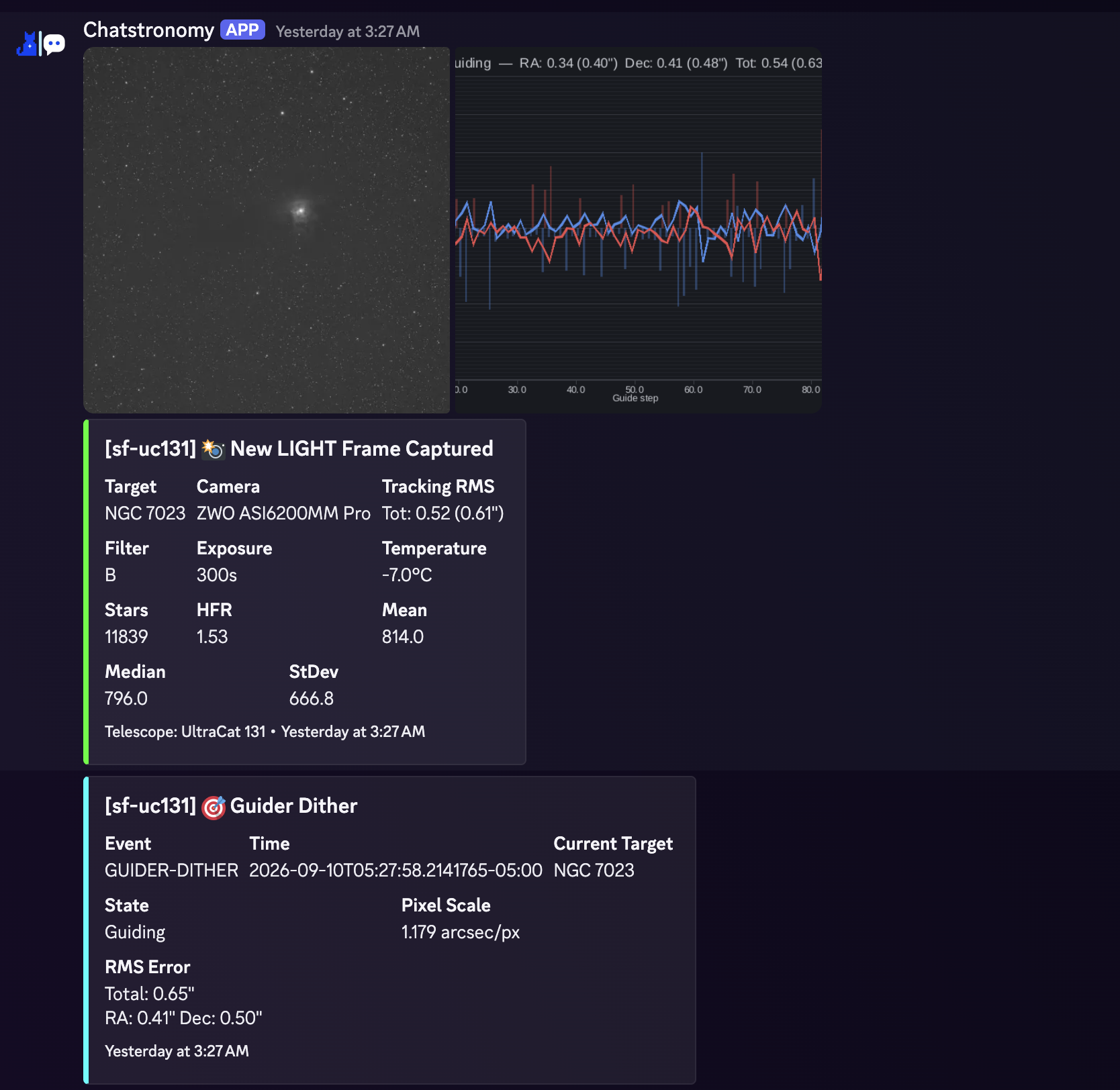
The bot can post new image captures.

When image delivery is enabled, captures are posted as JPEG previews up to 1,024 pixels wide with metadata such as the filter, exposure duration, and target. Image-save and camera-download failures are also reported. A configurable cooldown can prevent a fast sequence from flooding the channel.

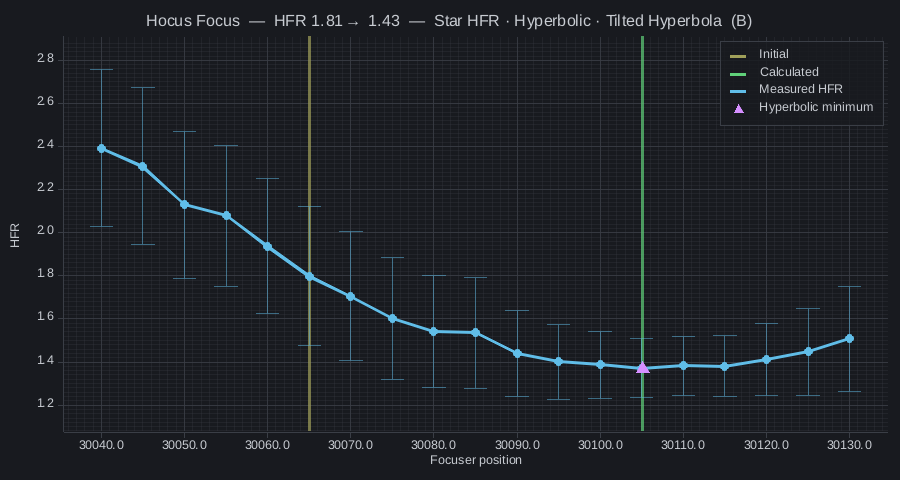
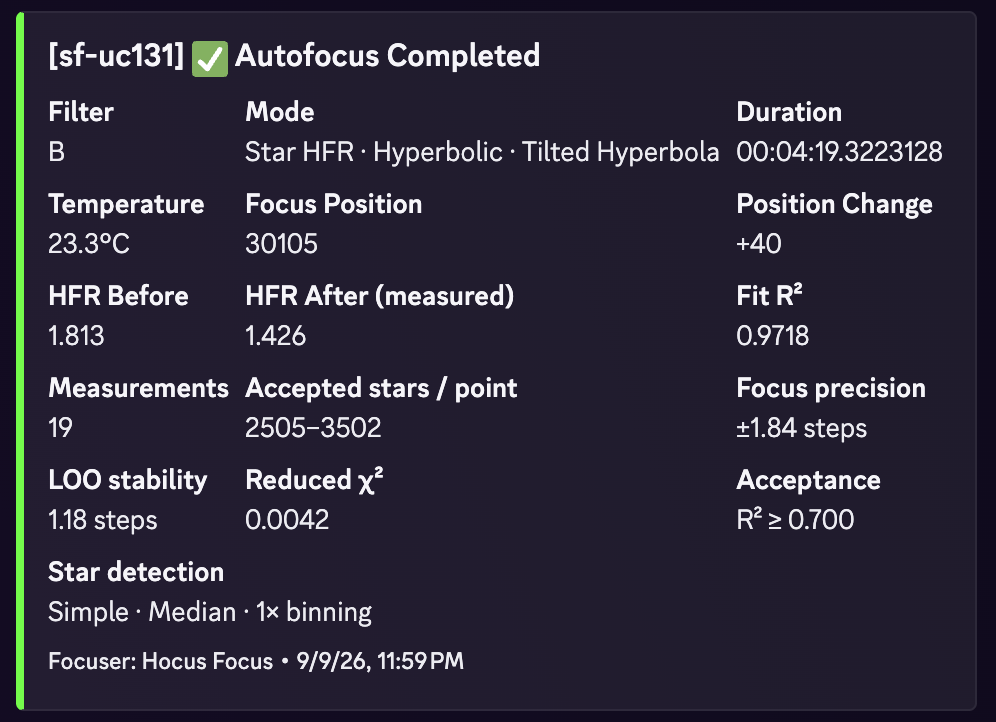
The bot sends autofocus and guiding charts.

When their event categories are enabled, each autofocus curve is built from the report matching that completed run, and guiding data is sent as a graph. Native N.I.N.A. Star HFR and Contrast Detection modes are supported. Hocus Focus reports add available fit quality, accepted-star range, region, validation, and algorithm details while falling back to the standard N.I.N.A. view when those fields are absent.

The bot reports live status updates.

Status updates include durable safety state; Sequence and Target Scheduler targets; camera cooling and warming; built-in timed, altitude, Moon-altitude, Sun-altitude, horizon, and safety waits; and supported Sequencer+ condition and manual waits. The bot reports sequence-item failures and presents clean, failed, stopped, cancelled, or otherwise ended sequence outcomes without treating every finish event as success. It can also report optional mount-slew and rotator-motion diagnostics, centering and plate-solve results, dome/shutter activity, flat-panel cover, light, and brightness changes, weather and switch-device connection state, N.I.N.A. notifications, and optional logs.

Timed sequence waits and Target Scheduler waits show their scheduled end time and remaining duration when available. Discord displays times in your local timezone with a live relative countdown; Matrix shows UTC times and the remaining duration when the message was sent. Target Scheduler's end time is an estimate: reaching it does not mean the wait has finished.

Slew and rotator diagnostics have separate switches and start disabled. They report observed starts, ends, and available positions. Slew updates can include the requested target and RA/Dec; altitude and azimuth require observatory-location sharing. Rotator updates include available sky or mechanical angles. If a short move is only detected after it began, it is marked Recovered after motion began, without a measured duration. Recovered mount starts omit altitude and azimuth. An ended update means motion was reported idle; it does not confirm settling or success.

Weather reporting uses two independent, default-off controls. Meaningful weather changes groups changed readings into rate-limited updates that can include numeric temperature, dew-point, humidity, pressure, cloud, rain, wind, sky, and seeing readings. High-wind alerts compares wind speed or gusts with your threshold in meters per second. Its records contain only wind speed, gust, threshold, and alert state, and report both alert and recovery. An active alert may be resent after reconnecting or changing the threshold to keep status synchronized without another chat alert. Weather-station names and device or driver identifiers are omitted.

Weather notifications are informational, not a safety system. Sensor readings or chat posts may be delayed, missing, or inaccurate, so keep independent weather monitoring and hardware interlocks in place. The plugin does not capture switch values or LiveStack data. Enabled popup notifications and opt-in raw N.I.N.A. logs remain unstructured text and may contain operational details. A dedicated Observatory and flat panel event switch controls dome/shutter and flat-panel activity; connection events use Equipment connections.

The Hub supports multiple rigs.

You can pair multiple N.I.N.A. instances on different systems with one centrally managed Discord bot, and then route each telescope's permitted updates to its selected Discord channels. Matrix rooms are available only with a local runtime.

The plugin generates visual telemetry graphs.

An autofocus run plotted as a V-curve of HFR against focuser position
The matching native N.I.N.A. or Hocus Focus report is plotted with the measurements and selected fit markers available for that run.
A guiding graph showing RA and Dec error over time
The guiding graph shows Dec and RA tracking error over time.

You can control the telescope using slash commands.

You can query the current status of your equipment and, when individually approved in N.I.N.A., issue commands directly from chat.

Use these subcommands under /chatstronomy in Discord. Read-only commands do not require hardware-control permission; image queries still require image delivery to be enabled. Matrix and Discord webhooks provide notifications, not slash commands.

With plugin 0.1.0.28 or newer, autofocus chooses its path automatically: it runs when N.I.N.A. is idle, or waits for the next light exposure boundary during an advanced sequence. Filter changes and target moves use the same approach. Add the matching Chatstronomy trigger to the target's enclosing instruction set to allow queued commands. For Target Scheduler's standard workflow, put the triggers directly on the Target Scheduler container. The simple sequencer and parallel instruction sets do not support queued commands. Requests are cancelled if their target, sequence run, profile, or local permission changes.

Target moves use the target configured inside N.I.N.A., never coordinates supplied through chat. When idle, exactly one advanced-sequence target must be loaded. Choose slew, slew and center, or slew, center and rotate to restore the target's position and framing. Cooling and warming remain available while sequencing. Parking, homing, unparking, guiding changes, and exposure abortion require an idle sequence; use stop-sequence first, and start-sequence to start the loaded advanced sequence when idle. A queued or accepted reply does not mean the operation has completed. See the command and trigger setup guide for the required triggers and local permissions.

Hardware control and every individual equipment command are disabled by default. Monitoring and read-only queries remain available. To permit a command, turn on both the local hardware-control master switch and that command's individual permission in the N.I.N.A. profile. Enabling the master switch alone grants no commands.

Skipping sequence validation requires separate local approval. Hub or Discord permissions can add further restrictions; neither can enable the master switch or grant an individual equipment permission. Review the hosted Hub terms or self-hosted terms for the risks of managing physical equipment remotely.

Observatory coordinates and location-derived mount readings are hidden unless location sharing is enabled in N.I.N.A. Hardware device identifiers remain redacted even when location sharing is on.

You can select your deployment topology.

The Chatstronomy Hub topology is recommended.

This option pairs multiple N.I.N.A. installations with a centrally managed Discord bot. The observatory computers make outbound encrypted WebSocket connections, which eliminates the need to expose N.I.N.A. or local ports to the internet. Hosted delivery does not support Matrix. Open the Hub to begin.

The local host topology is available now.

You can configure the N.I.N.A. plugin to run in Direct mode using a local Discord webhook, a custom Discord application, or a Matrix account. This approach does not route observatory data through Chatstronomy-operated servers; your selected Discord or Matrix service still receives posted content. The plugin manages the local background runtime automatically.

The software is open source and independently developed.

Chatstronomy is licensed under the Apache License 2.0 and developed publicly at github.com/theatrus/chatstronomy. It is independent software and has no affiliation with N.I.N.A., Discord, or Matrix. The project logo represents the integration of observatory systems with chat platforms.